Wednesday, March 23, 2011
post://2350774821227249358/I got my hands on Crysis 2 for PC yesterday. I was very excited having seen it and played it on multiple machines at PAX East several weekends ago. It came on one disk, which was good in regards to time to install, but I'm still impressed by GTA IVs 2 DVDs / 18G worth of textures and data.
I started it up and it was 4:3 by default... no one plays in 4:3 anymore, so straight to the options I went. The first thing I noticed was the lack of settings, though with some further reading I have heard that the display config file is editable. You can change the resolution, and the quality, so Low, Medium, High, and Ultra - though they all have their own special names like "Gamer" and "Extreme" for the top two.
I went realistic and set to 1920 x 1200 (basic 1080p at 16:10 aspect ratio) and Extreme, figuring I'd need to set it down once the game started. I have an AMD Phenom II x4 @ 3.2ghz, Dual Channel DDR3 @ 1600mhz (don't get me started on available SLi / TriChannel ram options for AMD chipsets) and 2 x EVGA 285GTX FTW 2G cards so based on the previous games (Crysis, Warhead) I assumed I'd still be a little behind the curve. That was not the case, all in all the game worked at a steady 60+ fps, no vsynch at 1920 x 1200 and a good 45fps at 2560 x 1600 in the Extreme setting.
I started the game and was treated to a phenomenal opening sequence, followed by a brief gameplay escape which cut to the intro credits and the initial introduction video. It set the scene for an ominous situation in the NY of the future (complete with completed Freedom Tower, I noticed) plagued by a widespread alien infection.
You start inside, murky warehouse windows, moderate light shining through. No light beams, and moderate grimy textures, nothing specifically too impressive, though it all looked good. You get outside pretty quickly and realize you've emerged onto a seaside warehouse roof with the city skyline in front of you. The ocean, trees, and ship in the dock is all obscured by heavy ansiotropic filtered light, a major part of the effects.
Another point I want to note was my test of the artifacts, the bullet holes and debris left by explosions. I shot a car, I didn't see any bullet holes, I got a bit closer... they appeared in strategic locations, not in others - there was nothing on the car window, or the back of the mirror, but there was several in the door. I shot them again close up, some appeared but as I backed up to (a virtual) 5 feet away, they went away. I shot the tire, it popped, stayed popped. I shot the hood with a smiley face pattern I didn't even get to half the smile before the eyes disapeared. This is on Extreme quality, mind you - that sort of stuff should be no problem to leave, especially for me with 2G of video RAM (with SLi you only get the video ram of 1 card since it uses the same amount for both cards). I then shot at an awning that was swaying in the breeze. I was impressed that the bullet holes appeared, cloth ripping is not really new, but physx is normally an afterthought - Batman uses it well with the cape, cloth tearing and uses it for some immersion. This was no physx. The awning moved again in the breeze and the bullet holes went away, as soon as the "cloth" breezed back to the 0 degree Y plane, the bullet holes appeared, and disappeared again as it breezed past it. I know I'm being picky, and this may pass on consoles but not for PC, especially with many other games that show it can be done well.
All I keep reading regarding the PC reviews about this game is "what do you mean, this is the best looking game to date!" Maybe for a console, but this is on PC - we're used to ports on PC, we put up with them, but this was originally a PC game and more is expected. EA bought it, pushed it for the money maker and this is what we get. My only hope is the hubbub about the DX 10/11 post-release patch. I don't know as that's going to do anything for the textures, but it seems silly that they'd limit the textures as (I'll use GTA IV in this example) other games have 2560 x 1600 textures to start, and they're reduced in size for the console version, and even the lower quality texture tiers on PC. This results in a better image overall because if you design the detail, reducing it actually smooths it out as well as saves GPU power / memory.
The story is cool so far, the gameplay is cool - nowhere else can you get a FPS that plays like this. It's truly gratifying to run up on someone in cloak and slit their throat, break their neck, or kick them in the back... sneaking, cloaking, shooting, and cloaking again is a little harder as it's designed so your energy has not regenerated enough in most cases so you still need to have some cover. Speaking of cover, there is a new method of cover I have not seen in any other game, counters and corners allow you to hold a key (or a mouse button) and move the mouse to "look" around the corner, it's more of an arc around / over the obstruction, which is very very tactical.
Story: Excellent
Sound: Amazing
Gameplay: Impressive
Graphics: Excellent for DX 9 / a year ago, low quality textures (above 1920 x 1080)
Technology: No x64 (yet?) no DX 10 / 11 (yet?)
Multiplayer: Broken (not available on launch day) - EA - Estimated Availability
All in all I have to fault it for the graphical shortcomings but I'll be playing the shit out of this game.
Here's some movies / screenshots:


Labels: 2011, games, graphics, Windows7
posted @ 10:19
-x-
(0) comments | Post a Comment
Friday, December 18, 2009
post://4672237220726642051/Windows 7 Games Explorer Manual Customization How To
Windows 7 has removed the ability from Games Explorer to Customize out of the box.
It's not impossible to do, however - it just takes some finangling and registry knowledge.
All of your Games Explorer shortcuts are stored here:
%localappdata%\Microsoft\Windows\GameExplorer
If you have games installed you should see several folders with very long names that start with {######...
Each of these is the unique game ID used by Windows to synch the icons and commands that appear in the Games Explorer to the actual EXE that runs the game.
These numbers correspond to the values in the registry here:
HKEY_LOCAL_MACHINE\SOFTWARE\Microsoft\Windows\
CurrentVersion\GameUX\Games
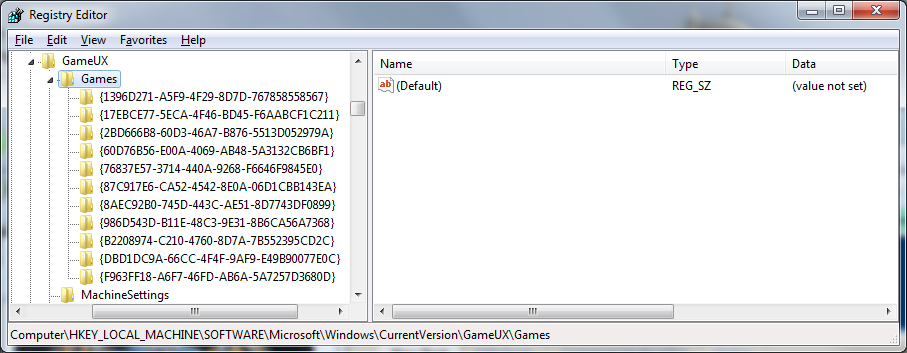
By clicking on one of the IDs in the registry you can figure out which game is which:
IE {1396D271-A5F9-4F29-8D7D-767858558567} is Batman for me.
When I click the ID folder the config options are on the right including the full path so you should be able to find which ID corresponds to which game.


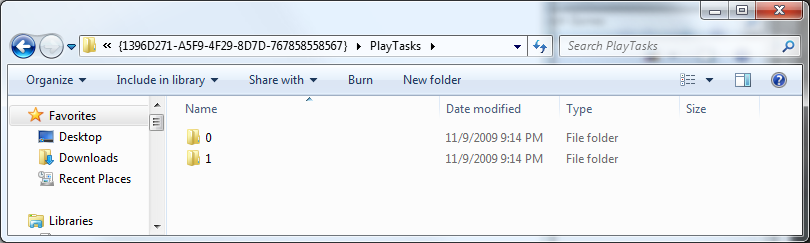
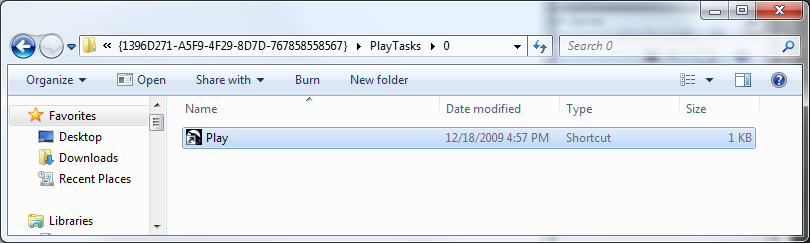
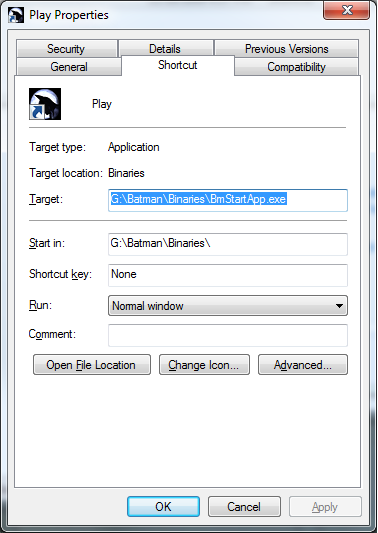
To modify the options for a game like change the path, or even add additional play or right click options, just modify or add a folder within PlayTasks for that game. I believe you are limited to 0 to 5 tasks, but try it. Batman's 0 task is Play and the 1 task is Support. So within PlayTask\0 (default) for Batman is a shortcut named "Play". Right click and choose properties as you would on any other shortcut and modify the files as you need to (run as admin, compatability mode, etc). To create a new play task you could make a folder named "3" and within that place a shortcut named as you'd like it to appear on the context menu.


Finally, you can also modify the box art shown in GamesExplorer or even add box art for games that don't have it by default by modifying the images in the
%localappdata%\Microsoft\Windows\GameExplorer folder.
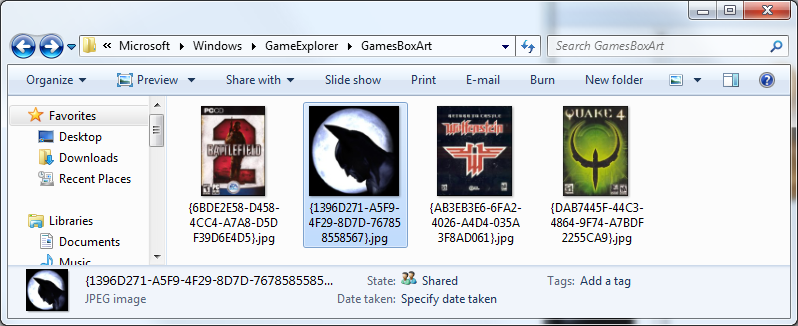
Simply name the file (jpg) with the same ID as the game, voila - you have your game listed with special icon or box art in Games Explorer.
Labels: 2009, games for windows, howto, technology, Windows7
posted @ 16:59
-x-
(0) comments | Post a Comment
Monday, September 14, 2009
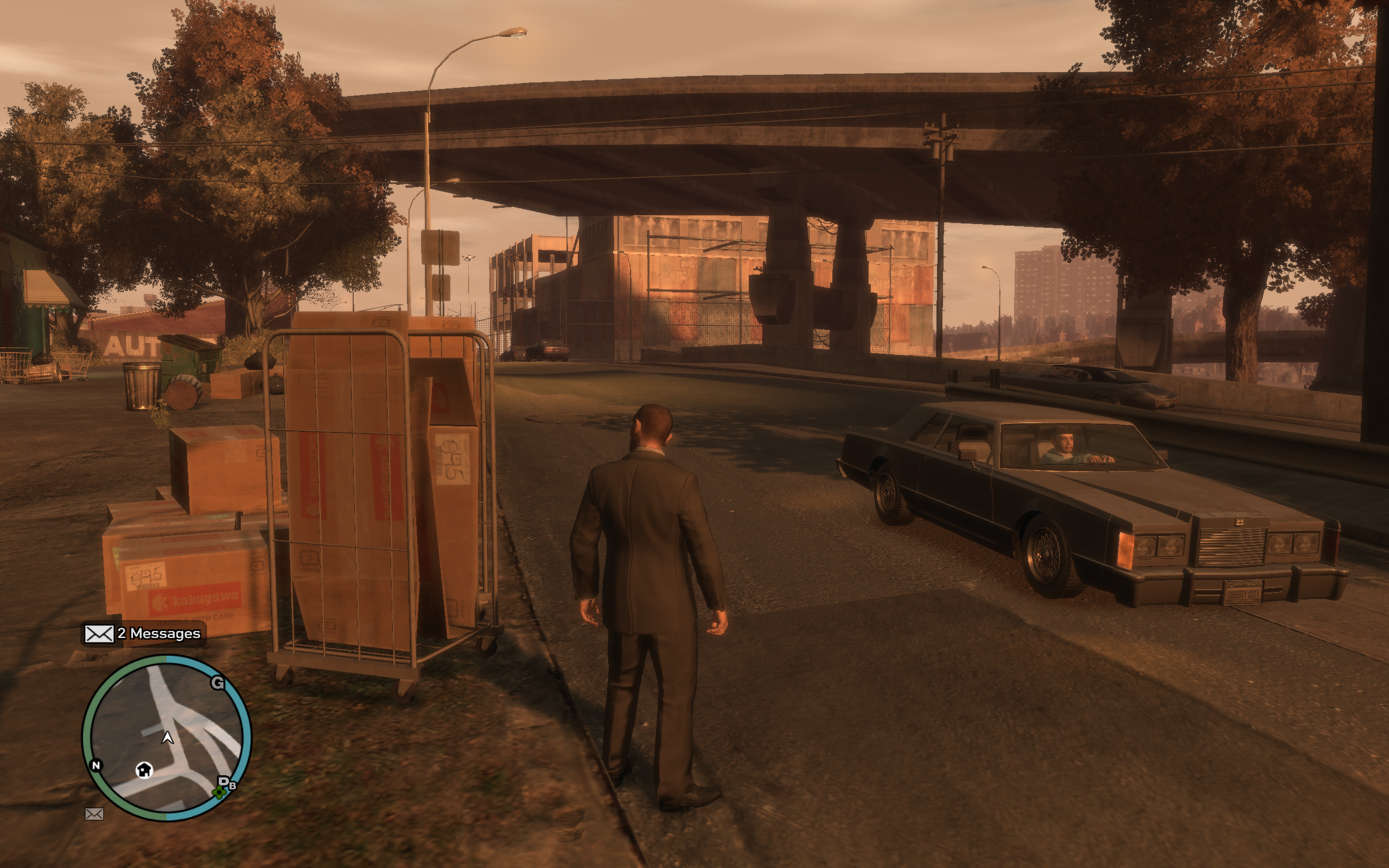
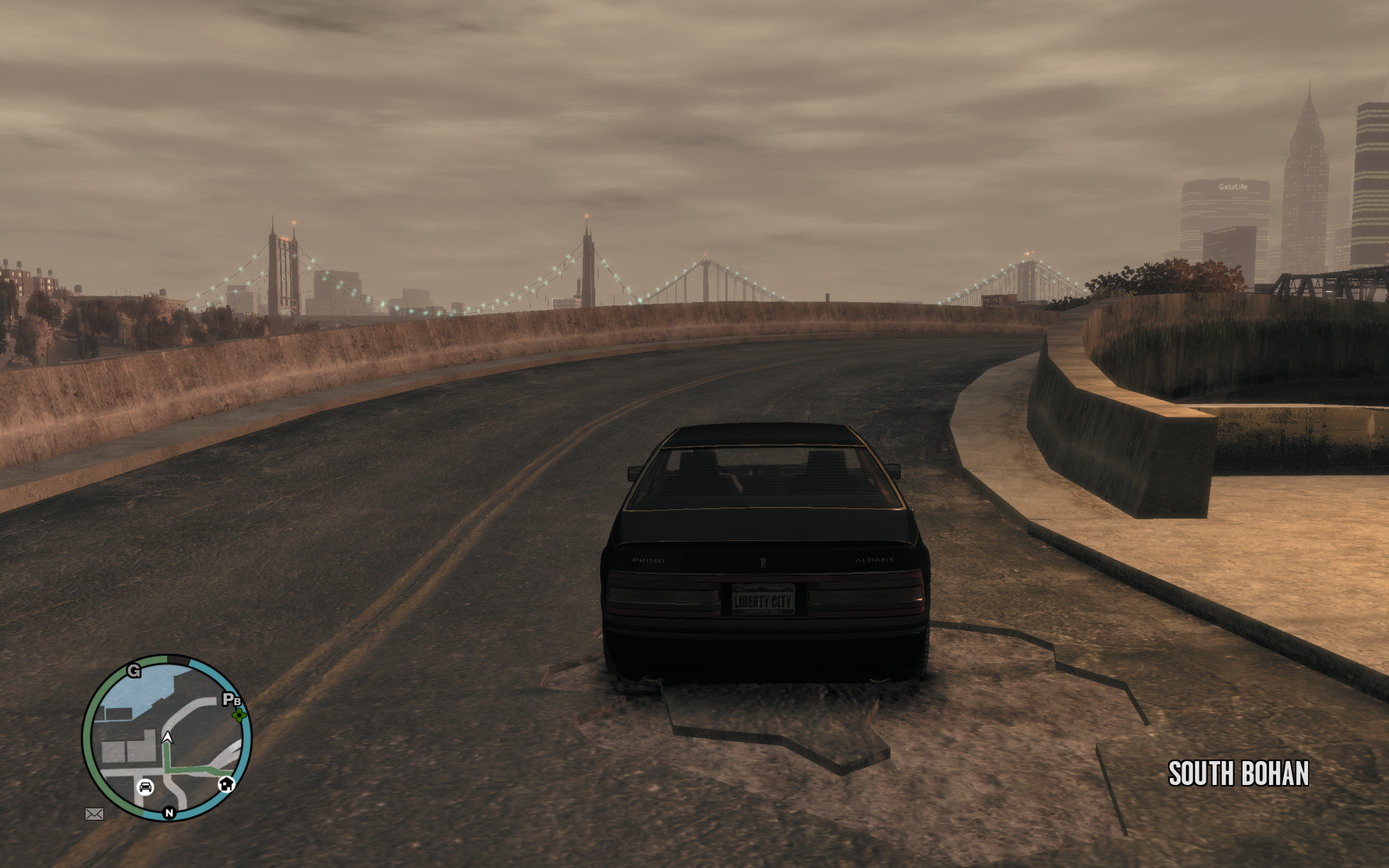
post://2466185940127249611/Here are some pics of GTA before and after.
Both are playable at 40 to 45fps.
Vista is overclocked video chip / mem ~ 745mhz / 1265mhz
Win7 is stock video chip / mem ~ 705mhz / 1215mhz
Vista .5
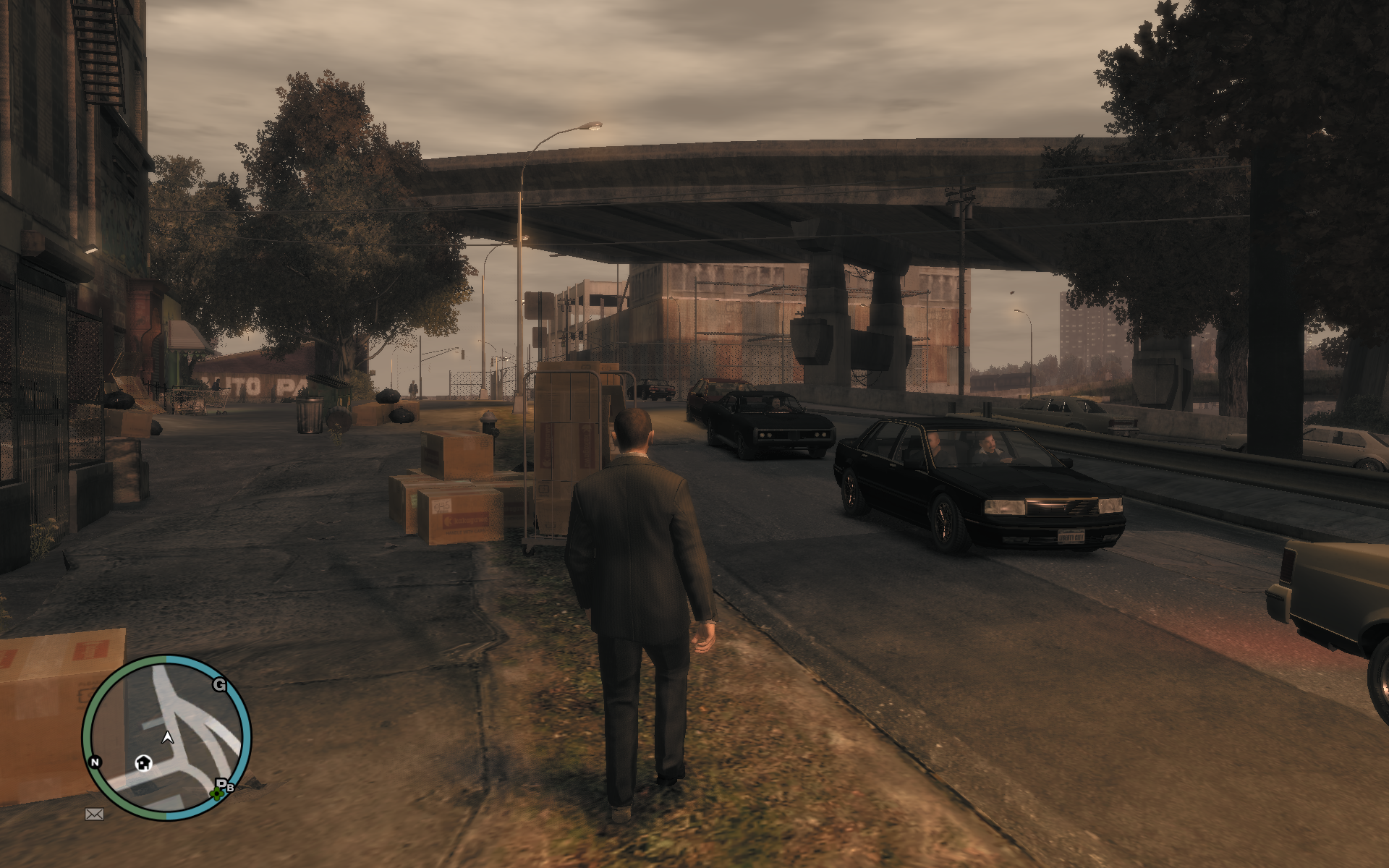
-----------------------
Vista 1

Win7 1

-----------------------
Vista 2

Win7 2
-----------------------
Vista 3

Win7 3

-----------------------
Vista 4
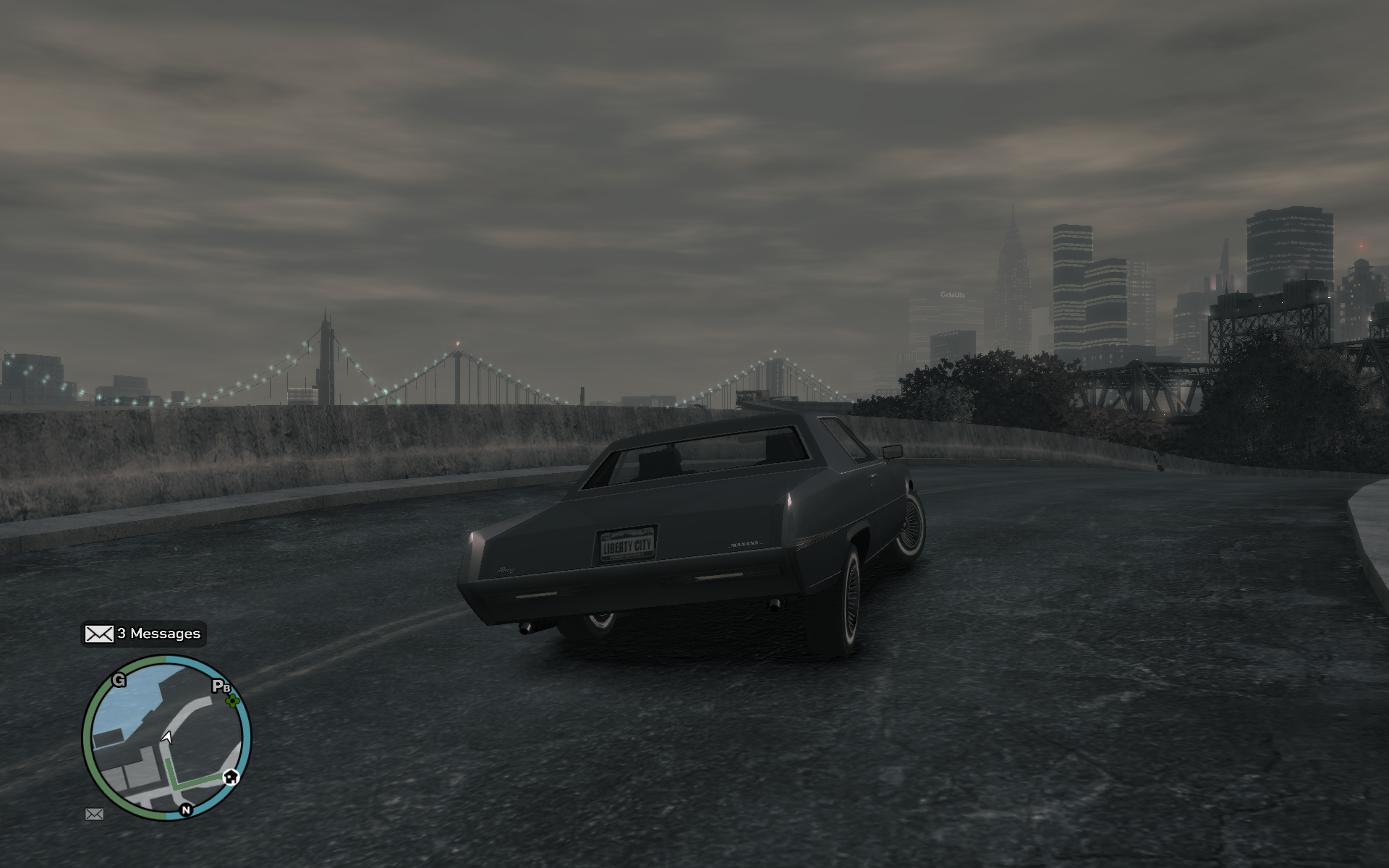
Win7 4
Labels: 2009, games, games for windows, graphics, screenshot, vista, Windows7
posted @ 14:20
-x-
(0) comments | Post a Comment
Saturday, September 12, 2009
post://2987336471837986745/6 installations later I have a working copy of Windows 7 with valid RAID, SATA, Chipset, Video, and Sound drivers. I was very careful this time, doing only one thing at a time and restarting after a change to confirm. I was a bit more cavileer when I was under the impression my errors could be undone. The restore feature was not able to handle the driver change for vital components so keep that in mind when you're upgrading. Vista had similar problems, I wasn't able to install it until SP1.
My first step once getting SLi working was to test the performace of games. I was able to test a couple DEMOs as is but GTA required a reinstall since it has so many background requirements. All in all I saw HUGE gains visually, everything ran better, something I'm not used to seeing from new (PC) OSs.
To further put this into perspective - in Vista my video cards are overclocked a good 40mhz higher, the video cards are running at stock speeds in Win 7.
Here are the numbers from GTA:
Windows 7 - GTA v1
Average FPS: 40.12
Duration: 37.37 sec
CPU Usage: 74%
System memory usage: 37%
Video memory usage: 50%
Graphics Settings
Video Mode: 2560 x 1600 (60 Hz)
Texture Quality: High
Render Quality: Highest
View Distance: 32
Detail Distance: 70
Windows 7 - GTA updated
Average FPS: 43.98
Duration: 37.45 sec
CPU Usage: 78%
System memory usage: 39%
Video memory usage: 53%
Graphics Settings
Video Mode: 2560 x 1600 (60 Hz)
Texture Quality: High
Texture Filter Quality: High
View Distance: 32
Detail Distance: 70
Vista - GTA updated 1920 x 1200
Average FPS: 37.65
Duration: 37.61 sec
CPU Usage: 81%
System memory usage: 44%
Video memory usage: 57%
Graphics Settings
Video Mode: 1920 x 1200 (60 Hz)
Texture Quality: High
Texture Filter Quality: High
View Distance: 75
Vista - GTA updated 2560 x 1600
Average FPS: 32.02
Duration: 37.72 sec
CPU Usage: 74%
System memory usage: 43%
Video memory usage: 59%
Graphics Settings
Video Mode: 2560 x 1600 (60 Hz)
Texture Quality: High
Texture Filter Quality: Very High
View Distance: 100
Detail Distance: 50
*update* Futuremark Vantage Score: 14100!
Direct Link
Labels: 2009, games, games for windows, RAID, technology, Windows7
posted @ 09:54
-x-
(0) comments | Post a Comment
Thursday, September 10, 2009
post://4541716393206416641/Windows 7 - Don't Rush It.
That's a cautionary statement, a metaphor, and a realization. I had a LOT of issues with this installation and I'm not even at a point where I can benchmark. 3... maybe 4 installations at this point and I think I've finally got it. I put in another HD so I could avoid RAID issues and I still run into them.
My motherboard has 10 SATA ports 4 on one SATA controller, 6 on nVidia SATA RAID. I avoided trying to bring over the RAID right away, instead having a single HD on the ontroller but not actually in RAID mode and STILL ran into issues. 7 even played with my RAID 1 a bit and broke the mirror after I installed the drivers but I really think that's more nVidia since it was completely dependent on their drivers. If nVidia didn't try and break whatever BIOS RAID existed when they installed their Windows software I might have not been impacted, but instead they gave me a minor heart attack by breaking my mirror. I restored it by killing the secondary RAID mirror and reallocating it via a rebuild to the first but dang if it didn't make me fear for my data in the meanwhile. I've lost too much data, finally learned to go mirror vs striping and this is how I am taunted. Whatever - worked out ok in the end after rebuild.
I finally have my nVidia control panel as I remember it, SLi and all. I can finally do some performance testing, and that's what I'm after.
PhysX off the onboard 780a SLI chip
Enabled SLi for the 2 x 285 2G EVGA cards
clicked apply... and... we have liftoff!
A system rating shows they've gone past the 5.9 max rating and I now get 7.9s on everything except the hard drives. However, Windows 7 is not running off my striping array so it's not really expected I'd get the best performance. It's all awaiting my theory of 2 x 120G SSD drives in Striping. I can't think of anything that could be faster. I don't know what that might drive to game performance but if previous experience is any indication - that's a sure cause to make me drop a hard earned dollar.
Labels: 2009, crash, desktop, RAID, review, SLi, technology, Windows7
posted @ 23:20
-x-
(0) comments | Post a Comment